Category: Main Digg

  • HP0-M55 HP0-M68 ArcSight ESM Administrator

    History of ArcSight ESM Administration Certification:

    HP0-M54 ArcSight ESM Security (aka HP Technical Certified II – ArcSight Security Administrator 2012).  Due to the acquisition of ArcSight by HP in 2010 and the recent move away from an Oracle backend, ArcSight ESM certifications have gone through almost yearly, back to back name changes.  What is now HP Technical Certified II – ArcSight Security Administrator used to be ArcSight Certified Integrator/Administrator (ACIA) aka ArcSight ESM Integrator/Administrator (AEIA).   And NOW, HP Technical Certified II – ArcSight Security Administrator expires 2 June 2014.  This certification cannot be acquired as of 2nd June 2014. The new certification is HP ATP – ArcSight ESM 6.5 Administrator V1 which is HP0-M68.

    reference:  http://h10120.www1.hp.com/expertone/view_certifications.html

    HP ArcSight ESM Objectives include:

    • Identify functions of ArcSight ESM components and perform steps to verify status and restart component services
    • Illustrate ArcSight connector basics
    • Identify primary types of storage in ESM and key components of event storage area, and understand retention policies
    • Describe how to use the ArcSight Console and how to configure the console preferences, and navigate within ESM resources
    • Depict how to use the Web Management Console to manage users and the CORR Engine (for NEW HP0-M68)
    • Identify files/folders that need to be backed up
    • Understand ESM authentication mechanisms and guidelines
    • Perform core ArcSight ESM administrative tasks
    • Identify stock content dashboards
    • Illustrate how to manage connectors (status, operation commands, dashboards, import/export configurations, upgrades)
    • Describe basic event management tasks
    • Identify basic troubleshooting tools, logs, and processes


    How to take the HP0-M54 ArcSight Admin Cert

    That certification can be taken through Pearson VUE.  You have to get an account with HP ExpertOne first.  HP issues an “HP Learner ID”

    The test cost about 250USD and has about 75+ questions.

    There are so many braindumps articles and “products” for this certification.  Its really unfortunate that HP has not done more to make this certification more relevant since ArcSight is the top SIEM in the world (circa 2014).  HP is trying but sometimes it seems they have more products and services than they can handle.  They did recently update HP0-M54 so thats positive.

    If you are planning on taking this certification, you should think about NOT doing braindumps.  Get some actual experience with the product.  You can downloaded it for a free trial and play with it.  If you want to make money in as an ArcSight subject matter expert you will have to put in some real time and effort.  The test will not do anything for you without experience.


  • iTunes 11.2 Security hole

    itunes sophos security issue
    itunes sophos security issue

    Sophos has discovered a security issue with iTunes 11.2.  Apple has is fixed the issue over the weekend.

    According to Apple’s security bulletin:

    The security issue has to do with a permissions issue that could allow anyone to modify local user accounts on a machine with Apple’s OS X.


  • e-mail spoofing

    Someone is sending an email to people on your contacts list claiming to be you.  They are trying to get your contacts to click a link or send personal information.  You are sure that you did not send the message.  This is called e-mail spoofing.  

    What attackers do is to use some email spam software to anonymously send out emails to all the contacts on exploited email accounts.  This is sometimes done with an “anonymous remailer” reference: http://en.wikipedia.org/wiki/Anonymous_remailer

    Why e-mail Spoof?

    The motivation behind it is to conceal the emails original point of creation while at the same time using a list of your contacts (some of whom trust you) to get them to go to a site.  That site can have a variety of intentions.  Its not always about malware, the site can also be used as an aggressive blackhat marketing campaign to get people to go to a site or sell products and/or service.

    But its also used for phishing attacks, network infiltrations, gathering insider information, and getting malware on systems.  Whether its advertising or malicious, e-mail spoofing is counting on the user to be unaware of the true nature of the email.

    Taking Action

    See if you account is just spoofed or hacked AND spoofed.  There is a difference.  If they are spoofing and somehow got all your contacts.. Honestly, SMTP (email) is not very secure by itself.  So there is not much you can do if your email gets spoofed except notify your contacts.  Imagine trying to stop someone from sending snail mail to your contacts with a return address that says its from you.. how do you stop that?  How would you even find out where they sent it from?

    If you account is being actively infiltrated and THEN spoofed there is something you can do.

    The first thing you should do is change your password.

    If you changed the password and they still got in, then it may be that they changed your alternate email address.
    A spammer may have altered your account information, allowing them to access your account again even after you change your password.
    Visit your Account Information page. — yahoo
    Go to Yahoo Account Page:
    Click Choose how Yahoo contacts you under “Contact Information.”
    Change the email address on file if you don’t recognize it.
    – For help, see adding an alternate email address to your account.
    How to check to see who recently accessed your account:


  • Heartbleed versus nmap

    The quickest way to detect if your site, organizations sites or just sites you use are vulnerable to the heartbleed bug you can use one of the following:
    mcafee: http://tif.mcafee.com/heartbleedtest
    http://www.f-secure.com/en/web/home_us/key?ecid=5856
    Another way to check is to used nmap.  .
    Requirements:
    -nmap -or-zenmap
    -authorization to scan*
    Step 1.  Install nmap/zenmap
    For Windows NT – 2K8
    Latest release self-installer: nmap-6.40-setup.exe
    Latest command-line zipfile: nmap-6.40-win32.zip
    *ridiculously Windows Install instructions: http://nmap.org/book/inst-windows.html
    Step 2. Install nmap heartbleed script & tls.lua
    Download the file tls.lua (https://svn.nmap.org/nmap/nselib/tls.lua)
    Move the tls.lua file to the nmap directory
    download the file ssl-heartbleed.nse (http://nmap.org/nsedoc/scripts/ssl-heartbleed.html)
    Move the file to nmap scripts folder
    Step 3. Run the Command
    nmap -sV –script=ssl-heartbleed <target>


    Other SSL Testers
    qualys overall ssl status: https://www.ssllabs.com/ssltest/
    Android SSL testers:
    Bluebox heartbleed scanner: https://play.google.com/store/apps/details?id=com.bblabs.heartbleedscanner
    Heartbleed detector: https://play.google.com/store/apps/details?id=com.lookout.heartbleeddetector
  • Am I affected by the heartBleed bug

    CVE-2014-0160
    CVE-2014-0160

    YES. If you use SSL/TLS – which is in https, secure Instant messaging, secure email on other “secure” services online, then there is a better than 60% chance you are affected or have an account that was vulnerable.


    What can you do about it?

    Get informed. Here is a little information on what it is, what it affects and how to protect yourself and/or organization.


    Why should you be concerned?
    This weakness allows attackers to steal information you thought was protected.  So things like bank, hospitals, and other critical resource may have been susceptible to the vulnerability for years.
    As mentioned above, SSL/TLS provides security for banking, online shopping, instant messaging, email and other services.  The heartbleed vulnerability allows anyone on the Internet to read the memory of the systems protected by vulnerable versions of OpenSSL.  If someone can read the memory of the system, they can access the secret key used to identify the service providers, and to encrypt the traffic, the names and passwords of users.
    More on HeartBleed:
    Heartbleed is a major vulnerability in OpenSSL.  This vulnerability has been known since 2012 or 2011 by NSA and others.  The NSA used it as a method of infiltrating systems for spying (rather than notifying the good citizens of Earth).  The NSA is not winning friends lately.
    What versions of OpenSSL are affected?
    Users and service providers using OpenSSL 1.0.1 through 1.0.1f .
    Who is Safe?
    According to codenomicon‘s site http://heartbleed.com/
    • OpenSSL 1.0.1g is NOT vulnerable
    • OpenSSL 1.0.0 branch is NOT vulnerable
    • OpenSSL 0.9.8 branch is NOT vulnerable

    Bug was introduced to OpenSSL in December 2011 and has been out in the wild since OpenSSL release 1.0.1 on 14th of March 2012. OpenSSL 1.0.1g released on 7th of April 2014 fixes the bug.
    more on heartbleed:
    In the news: http://abclocal.go.com/kgo/video?id=9498581

    CVE-2014-0160
  • computer starts up slow

    I noticed that my computer was starting up slow.. SUPER slow!  I ignored it for a long time… months.  But I noticed each time I added new software, the system started up slower and slower.

    Why your computer starts up slow?  These days when you install new software, its default setting is “autorun” which means, it is set up to start when your computer starts.  So if you notice 30 different applications are popping up when you boot up your system, that is why the system is slow.  Its starting each app.

    If you computer starts up slow, here is how you can get it much faster.

    computer starts up slow msconfig.exe
    slow computer start use msconfig.exe

    computer starts up slow – MSCONFIG

    The first place to check out for slow reboots, is msconfig.

    Go to Start | Run | type “msconfig” | Enter

    “MSConfig (officially called System Configuration in Windows Vista, Windows 7 and Windows 8 or Microsoft System Configuration Utility in previous operating systems) is a system utility to troubleshoot the Microsoft Windows startup process.”

    Once you click Enter you will see the msconfig message box.  Once you are in msconfig, select the “Startup” tab and you will see all the software that is set to startup when the system starts up.

    computer startup slow msconfig
    computer startup slow msconfig

    MSconfig show the root of the problem.  I had scores of proprietary applications starting up by default, not to mentions a dozen other applications that I had installed and left default.  This is why my system was taking anywhere from 3-5 minutes to be of any use.  I would often avoid turning off the system just so I did not have to wait each time for it to boot.. NOW THAT IS LAZY!!

    Once in MSconfig, disable the applications you don’t want starting when the computer starts.  Once you are complete, click OK.

    And you are done.

    Here is another place you can check for application startups:

    computer starts up slow Startup

    computer starts up slow Startup

    BONUS ROUND!! – Search Conduit – backgroundcontainer RunDLL

    I had a pesky “RunDLL” file that kept trying to run when my computer was starting.  I did not see it in the Startup folder or in MSConfig.  But I noticed that it was from some adware called SearchConduit (my arch nemesis).  I had removed it months ago, but it is so aggressive, spammy and similar to malware that it leave hooks in the registry keys.

    Here is how I removed it.

    computer starts up slow RegEdit FIND RunDLL
    computer starts up slow RegEdit FIND RunDLL

    You will have to go to regedit - Start | Run | regedit

    *I don’t recommend regedit unless you are comfortable with doing complex configurations on your PC.. if you don’t know what your doing, you can destroy you OS in regedit*

    Once in regedit, click CTRL+F (find) and search for the key.  delete the key.  You will need to delete if from the left side of the regedit panel or you will get the error you see displayed.

    If you did all of this, you cleared all irrelevant default starts from legit applications and removed any DLLs that are not supposed to be there and you computer is still slow, you may have a completely different issue:

    • defrag your hard drive
    • Maybe you have malware (i use webroot & spybot search and destroy)
    • You have very agressive (hidden) adware (spybot search and destroy.. it works)
    • Your computer is too old (try newegg, they have good prices)
    • Your computer needs more memory (RAM check Task Manager – check memory usage)
    • Your hard drive is jacked up (may hear a crunching or metal on metal sound)


  • 6 Tips on Working Abroad and Avoiding Recruitment Fraud

    6 Tips to Get Work Abroad and Avoid Recruitment Fraud

    Recruitment fraud is a fairly common type of fraud that hits many overseas workers looking to stay in another country to have a decent income.  Many overseas filipino workers, for example, are affected by recruitment fraud.  They are offered what sounds like a good opportunity for work, but to start they the process they are asked to pay a fee.  After paying the fee they find out the job is not real.

    avoid-recruitment-fraud
    avoid-recruitment-fraud

     Here are some tips to avoid recruitment fraud:

     1. Do not give any amount or a placement fee as some of them are fake unregistered agencies. Agencies provide the tickets and accommodations abroad for countries such as Middle East, Singapore, UK and US.  While some companies and countries do require a placement fee you should double check the company and laws of that particular country.  If you must pay a fee, get a receipt.

     2. Re-check the license of the agency you are applying for if it exists in Philippine Overseas Employment Association, POEA or other national overseas agencies that keep track of the licenses.

    3. Do not settle for a tourist visa for working purposes because it can get you in trouble abroad. There is some risk to working on a tourist visa.  Some countries may be strict on how certain visa are used.  Some filipinos are punished, deported and/or imprisonment.

    4. Read papers carefully before signing the contracts. Whatever agreements are stated in the contracts regardings policies and salary matters can be use for future circumstances.

     5.  Check your passport.  Make sure your passport is legitimate.  It should have at least 6 months before it expires.  Resist the temptation of trying to “game the system” with fake visa or passport.  Anyone using a fake identity may be caught by authorities and face charges of imprisonment, deportation or be banned from other countries for a period of time.

    6. Make sure all documentations submitted to the agency are processed to avoid delays, job cancellation and other problems upon leaving the country.


    Working abroad can be very rewarding.  After all the paperwork and medical evaluations you might have to do, if you land a good job overseas it can be great.  Just double check documentations to make sure you don’t get caught up in recruitment fraud and don’t neglect the process and procedures that the country requires you to do.


  • diacap to diarmf: manage information security risk

    Risk Management Framework is implemented throughout an organization.

    NIST 800-39, Manage Information Security Risk, describes how to implement risk within t three layers (or tiers) of of an organization:

    Tier 1: Organization level
    Tier 2: Mission/Business Process level
    Tier 3: Information System level

    diarmf risk management of information security

    Tier 1: Organization Level risk management
    Tier one addresses security from the organizations perspective. The activities include the implementation of the first component of risk management, risk framing. Risk framing provides context of all the risk activities within an organization, which affects the risk activities of tier 1 & 2. The output of risk framing is Risk Management Strategy. In tier 1 the organization establishes and implements governance structure that are in compliance with laws, regulations and policies. Tier 1 activities include establishment of the Risk Executive Function, establishment of the risk management strategy and determination of the risk tolerance.

    Tier 2: Mission/Business Process Level risk management

    Tier 2 risk management activities include: 1) defining the mission/business processes to support the organization. 2) Prioritize the mission/business process with respect to the long term goals of the organization. 3) Define the type of information needed to successfully execute the mission/business processes, criticality/sensitivity of the information and the information flows both internal and external of the information.

    Having a risk-aware process is an important part of tier 2. To be risk-aware senior leaders/executives need to know: 1) types of threat sources and threat events that could have an adverse affect the ability of the organizations 2) the potential adverse impacts on the organizational operations and assets, individuals, the Nation if confidentiality, integrity, availability is compromised 3) the organization�s resilience to such an attack that can be achieved with a given mission/business process

    Tier 3: Information System risk management

    From the information system perspective, tier 3 addresses the following tasks:
    1) Categorization of the information system
    2) Allocating the organizational security control
    3) Selection, implementation, assessment, authorization, and ongoing

    Chapter 3 focuses on the step to have a comprehensive risk management program. The tasks discussed include:
    Risk Framing
    Risk Assessing
    Risk Response
    Risk Monitoring


    For more information go to: http://elamb.org/training-certification800-39-manage-information-security-risks/


  • DIACAP to DIARMF: Assessment Authorization

    DIACAP to DIARMF: Assessment Authorization

    With the move from certification and accreditation (C&A) to risk management framework, comes a few new terms.  “C&A” will be replaced with assessment and authorization.  Even though “information assurance (IA) controls” will be call “security controls”, the definition and work is still the same, but the hope is that its done continuously and more cost-effective.


    Certification (NIST Assessment) – Comprehensive evaluation of an information system assessment of IA Controls/Security Controls to determine the extent to which the controls are implemented correctly and operating as intended. That means when evaluated, they produce the desired outcome.  An assessment is about gathering information to providing the factual basis for an authorizing official (Designated Accrediting Authority) to render a security accreditation decision

    Accreditation (NIST Authorization) – Security accreditation is the official management decision to operate (DAA – Formal approval of the system). Authorization is given by a senior agency official (upper-management/higher head quarters/combat commander). The official should have the authority to oversee the budget and business operations of the information system explicitly accept the risk to operations, assets, individuals. They accept responsibility for the security of the system and are fully accountable for the security of the system.

    “The official management decision given by a senior organization“The official management decision given by a senior organizational official to authorize operation of an information system and to explicitly accept the risk to organizational operations (including mission, functions, image, or reputation), organizational assets, individuals, other organizations, and the Nation based on the implementation of an agreed-upon set of security controls.”

    – NIST SP 800-37 rev 1

    March 14, 2014, UPDATE RMF – DoD IT:

    DIARMF will be known as Risk Management Framework for DoD IT.


  • gmail security

    gmail security

    Gmail is one of my favorite email products.  Its free, its extremely good at collecting and organizing data (in-line with google’s vision of world information organization domination) and its so intuitive.

    The gmail security features are kind of tucked away to bring the organization and search functions to the foreground.  But once you know where they are, its easy.

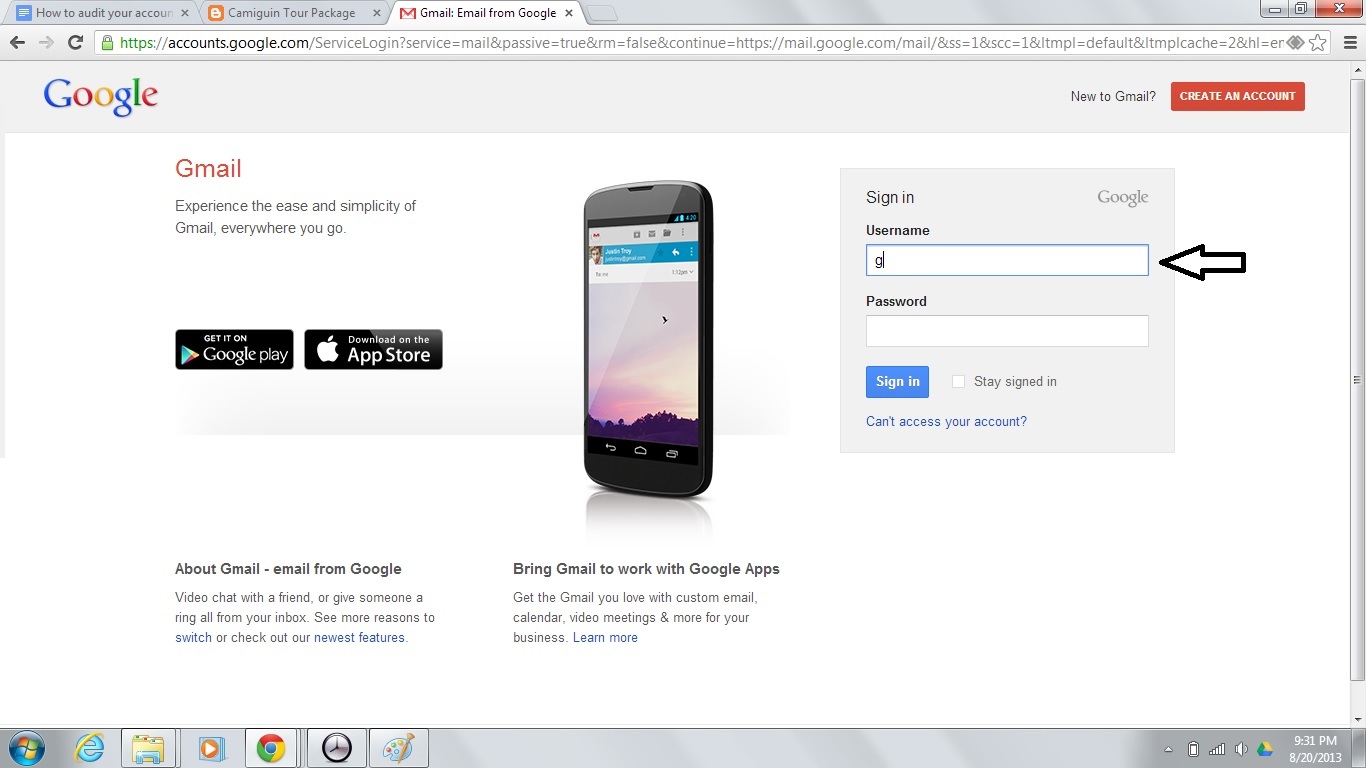
    1. First, browse into your email and sign in.


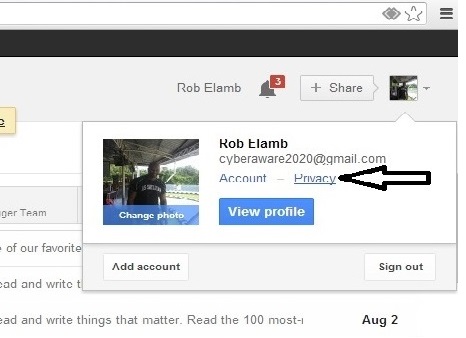
    2. Inside your email under your name, click privacy.

    3. Under Account Privacy, hit Security and add alternate recovery email and mobile number.   This will allow gmail security to alert you of any suspicious activity such as someone attempting to access your account.

    gmail security
    gmail security